

The interface of PandaSuite Studio
≈ 800 tokens, Approximate size of this page for an AI assistant
Welcome to PandaSuite Studio! This visual editor allows you to create your interface, add interactive features with components and customize user workflow very easily.

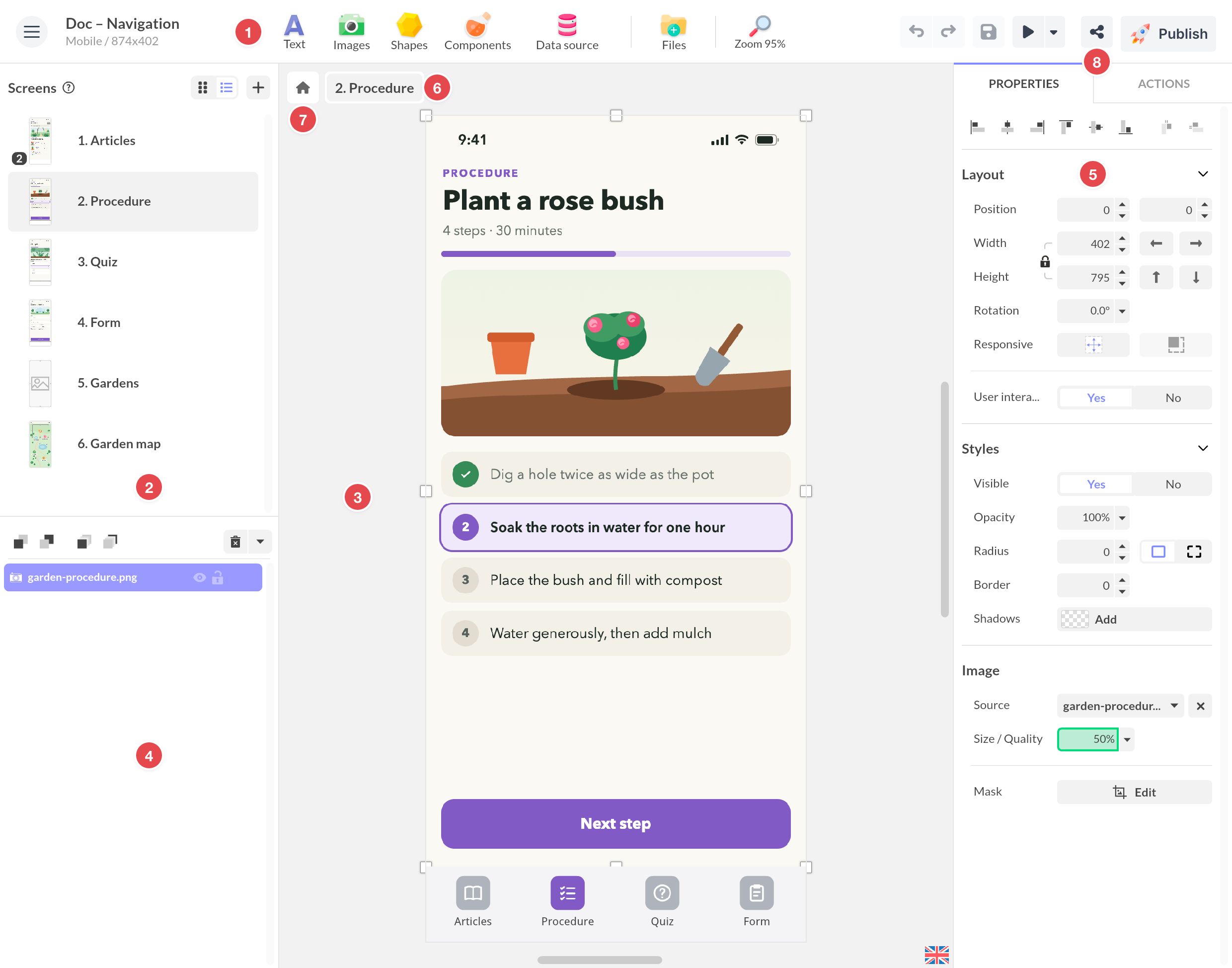
- The header: easily access the main actions to insert content: add a text block, an image, a vector shape, a component or a data source, and manage your files. Customize workspace settings from the zoom menu (zoom, grid, tabs etc.).
- Navigation: your application is composed of screens. Create screens, select the one you want to work on. Click the selected screen again to see its states.
- The creation area: this is the visible area where you create the interface of your application. You can place objects out of the screen, especially to create transitions and animations.
- Objects: find all objects, graphic or not, that are available at this level. Graphic objects (text, image, pop-up…) are at the top of the list and isolated from system objects (Beacon sensor..) by a separator. Their order in the list indicates their position in terms of depth: those at the top of the list are located above the bottom objects.
- The properties / actions: get access to the properties of the selected object and add an action.
- The breadcrumb: it lets you know what level you are at (screen, state, component). To go to a higher level, click on it in the breadcrumb.
- The project: click the house icon to reach the project level. There you find the screens, the foregrounds and backgrounds that create global elements, the project properties, and the components, data sources and actions of the whole project.
- Preview, share and publish: click Preview ▶ to see the web version of your application, or the arrow next to it to test the project on your phone with a QR code. Share gives the sharing link of your project, its QR code, and its embed code. Publish shows what moving to production would update, layout by layout, and the apps the project is in. Remember to save your project regularly: there is no automatic backup.